 RAMKeeper
その RAM 代は、もう払いました。
あとは 1 GB も無駄にしない。
2026 年、メモリは一気に高くなりました。だから RAM が最小構成の Mac を選んだはずです。RAMKeeper は、そのメモリを食っているのが何なのか(ChatGPT、Slack、Chrome)を正確に示し、対処するためのルールを渡します。気休めはありません。macOS が報告する本物の数字だけです。
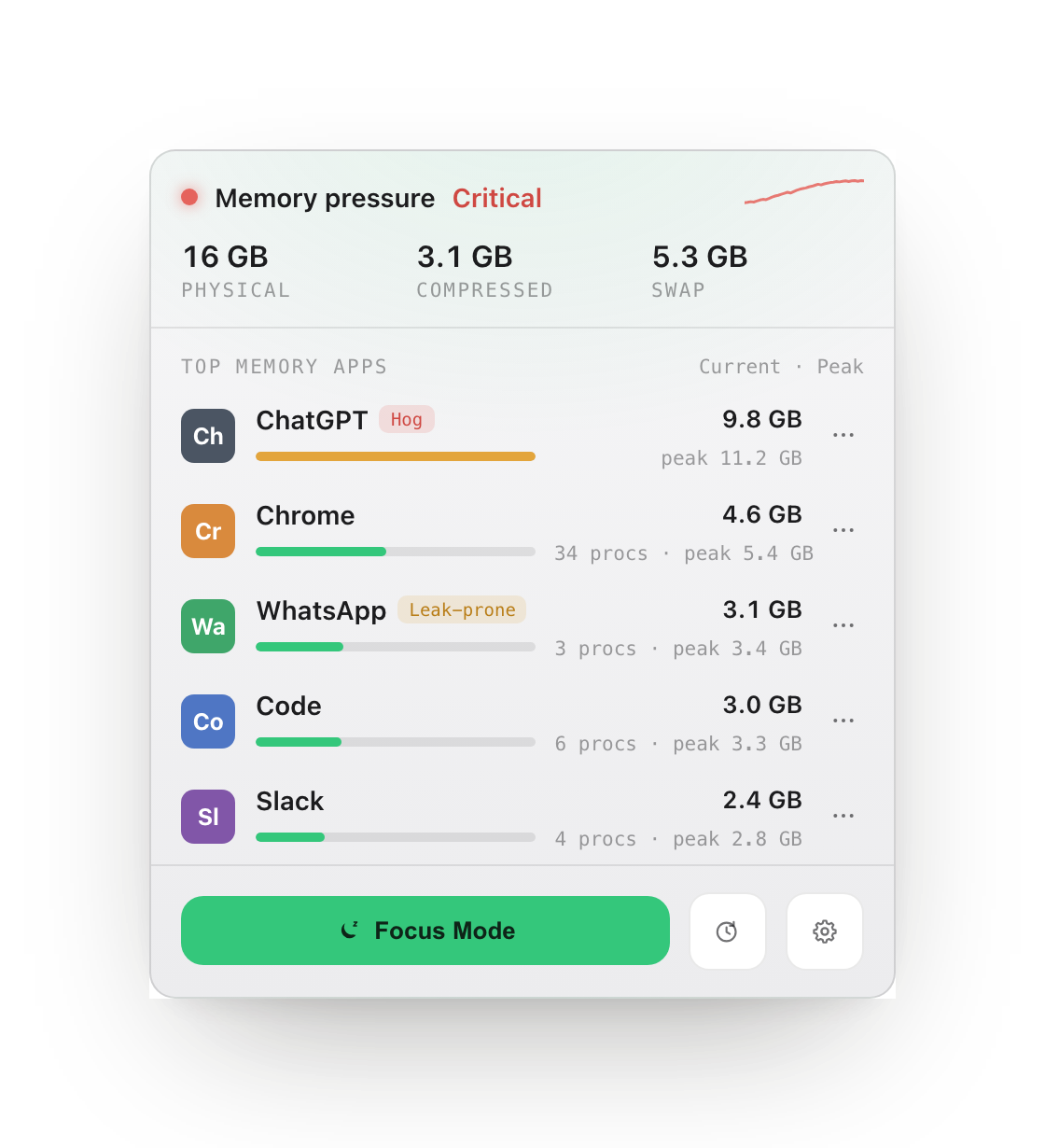
気休めはなし
「解放したメモリ」の数字がいくら動いても、何の証明にもなりません。
macOS のメモリ管理は、もともと十分に積極的です。だから演出はやめて、本当に効く 3 つのことだけをやります。どれも実測した前後の数字で裏付けます。
正確な原因特定
App ごと、レンダラープロセスごとにメモリの内訳がわかります。ChatGPT、Slack、Chrome Helper のような大食いは自動でタグ付けし、現在とピークを並べて表示します。
しきい値による制御
App にメモリの上限を設定します。あなたが選んだ時間ずっと上限を超え続けたときだけ、RAMKeeper は推測ではなくあなたのルールどおりに動き、何をしたかを正確に記録します。
集中モード
バックグラウンドの App をまとめてワンクリックで一時停止し、戻ってきたら再開します。メモリの増加が止まり、CPU の奪い合いもなくなるので、いま使っている App がマシンを使い切れます。
実際の画面
本物の画面。macOS が出した、本物の数字。
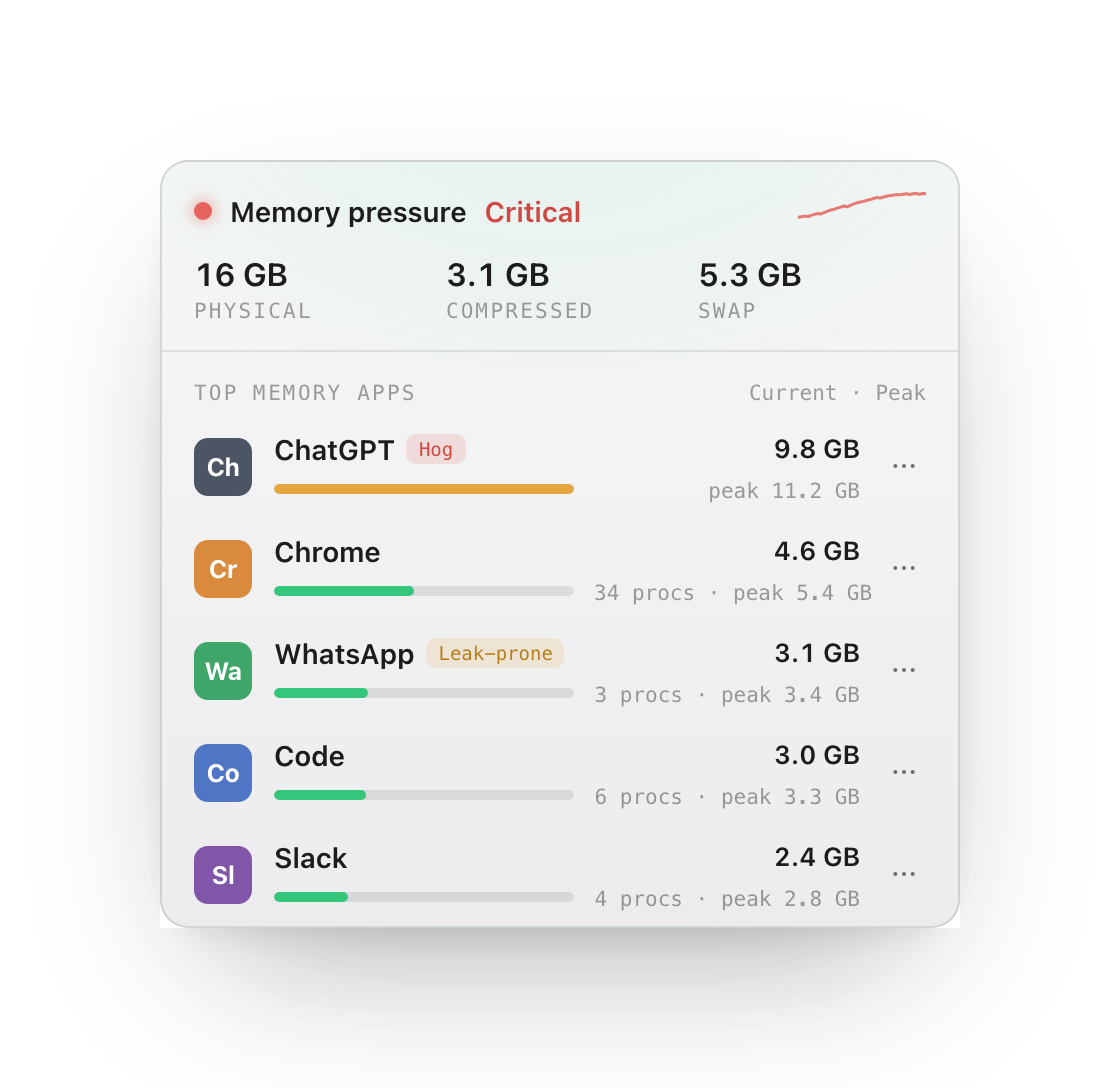
犯人を正確に突き止める。
ブラウザや Electron のヘルパープロセスは親 App にまとめ、現在とピークを並べて表示します。正体のわからないプロセスの羅列ではなく、ウィンドウ 1 つあたりの本当のコストが見えます。
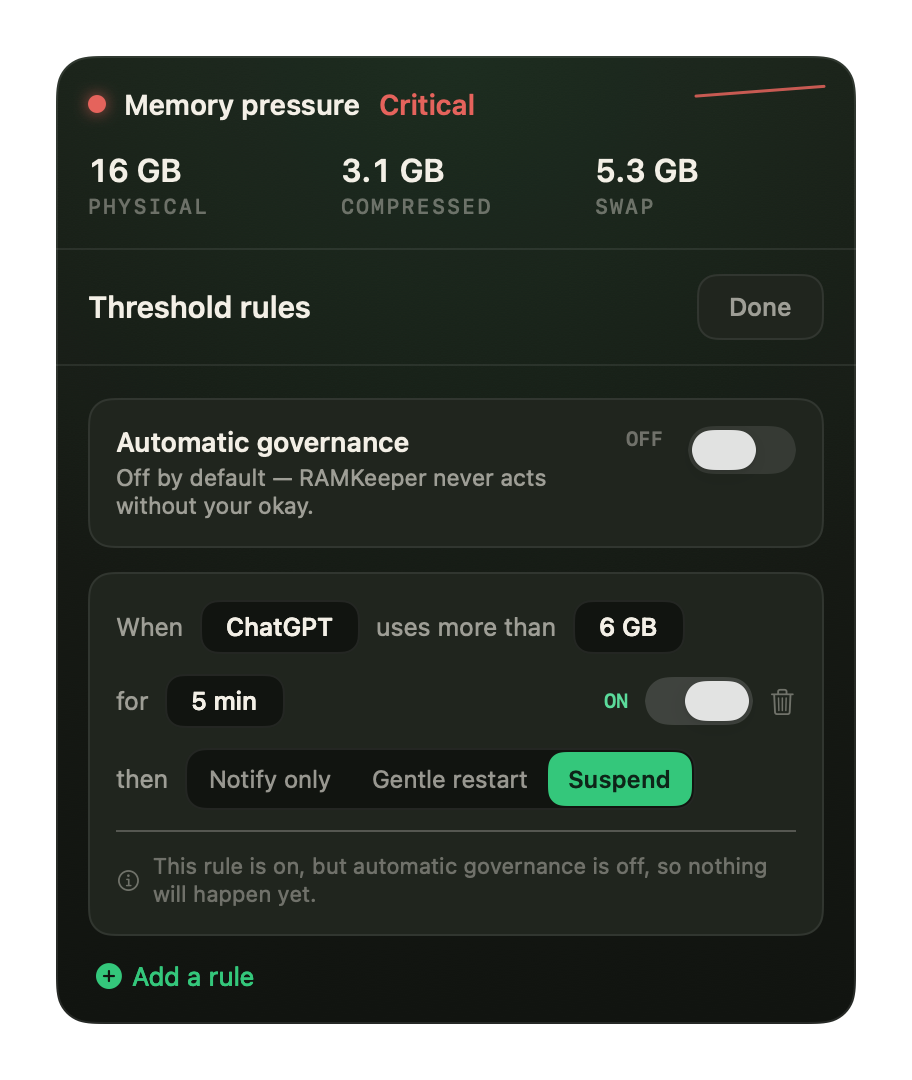
上限を決めたら、あとは任せる。
App がしきい値を十分な時間だけ超え続けたとき、RAMKeeper は通知したり、終了して開き直したり、一時停止したりできます。初期設定はオフ。あなたの許可なく動くことはありません。
ワンクリックで、5 つの App が奪い合いをやめる。
集中モードは、重いバックグラウンド App をまとめてフリーズします。メモリを確保しなくなり、CPU を奪い合わなくなり、そのメモリは触られずに冷えていき、macOS が圧縮する有力な候補になります。終了すれば、すべてが元の状態のまま再開します。終了させる App はなく、失われるものもありません。
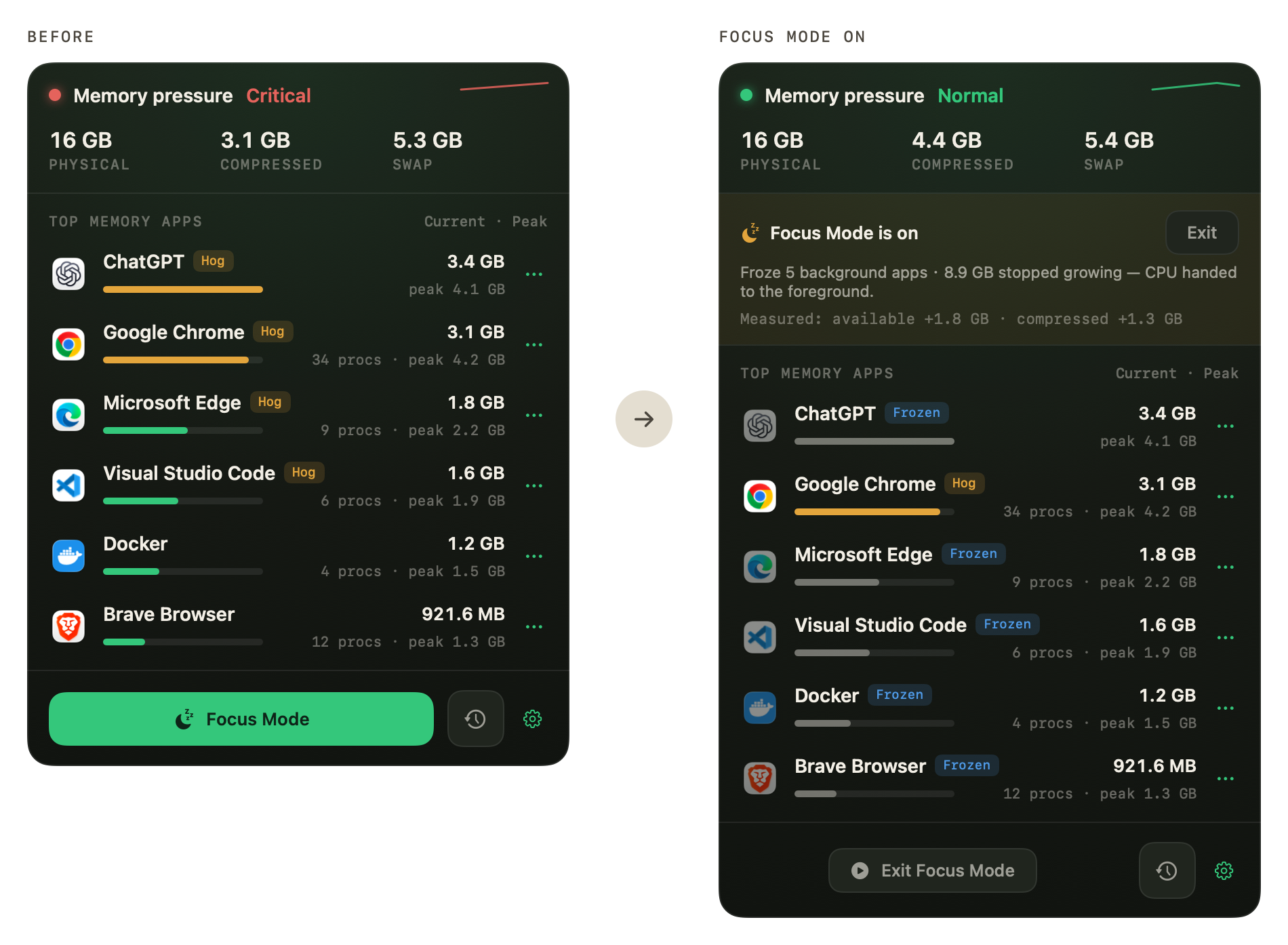
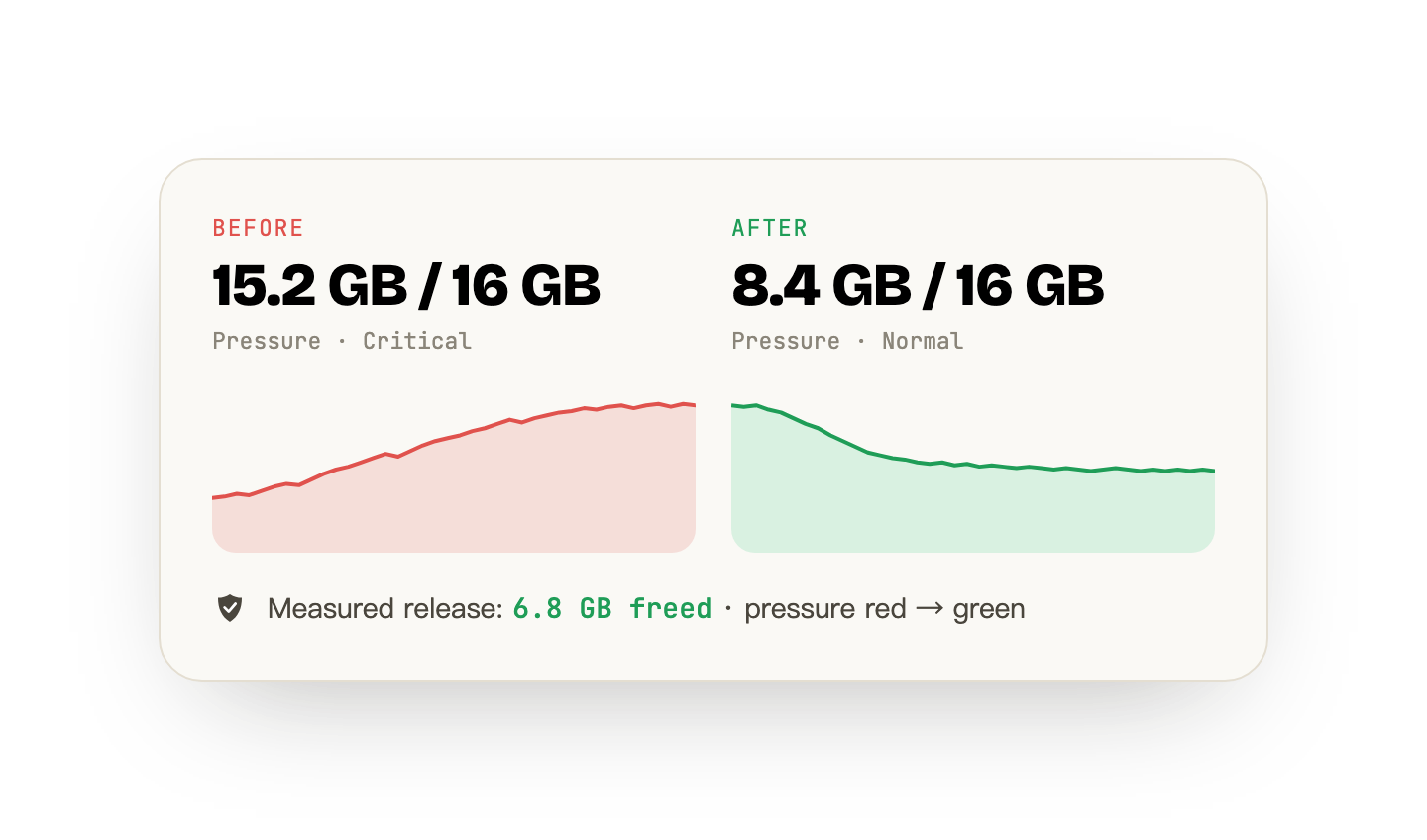
この数字は macOS のもので、私たちが作ったものではありません。
どの操作でも、システムが前後に報告した値を記録します。終了して開き直したときは、実際に返ってきたメモリ量を表示します。「解放したメモリ」の数字を作り出すことはしません。効果が小さかった操作は、そのとおりに記録されます。
順を追って解決
「なんかおかしい」から「直った」まで、3 ステップ。
メモリプレッシャーの健康診断
メニューバーにシステム全体のプレッシャー(緑 / 黄 / 赤)と、スワップおよび圧縮メモリの値を表示します。サンドボックスにより見えるのはシステム全体の数値だけ。これは誠実な境界であって、機能を削った版ではありません。
- リアルタイムのプレッシャー表示
- スワップと圧縮メモリの数値
メモリを食っている正体がわかる
サンドボックス外のビルドは、App ごと・レンダラープロセスごとにメモリを割り出し、いちばん悪質な大食いを自動でタグ付けし、現在とピークを表示します。原因がようやくはっきりします。
- App 単位・レンダラー単位の内訳
- 大食いの自動検出
- 現在とピークの履歴
ワンクリックで対処
しきい値の自動ルール、バックグラウンド App をまとめて止める集中モード、そして終了して開き直す機能。メモリを実際に返させるのは開き直しで、しかも App に先に保存する機会を与えます。
- しきい値の自動ルール
- 集中モード(一時停止 / 再開)
- 大食い App を終了して開き直す
ガイド
macOS は実際にどうメモリを扱っているのか。
"Your system has run out of application memory"
What the macOS out-of-memory dialog actually means, why it fires on Macs with plenty of RAM, and how to find the process responsible instead of force-quitting at random.
Do Mac memory cleaners actually work?
What macOS already does with your RAM, what "free up memory" tools really change, and why 4% free RAM on a 64 GB Mac is a sign of health rather than trouble.
How to monitor RAM usage on a Mac
Activity Monitor, vm_stat and the menu bar — three ways to watch memory on macOS, and what every figure in the Memory tab means.
Stats vs iStat Menus vs Activity Monitor
Three ways to watch a Mac's memory and what each is actually for, including the honest answer about which to install first (the free one).
How to free up RAM on a Mac
What actually returns memory on macOS, what only appears to, and why the honest answer to this question is usually that you do not need to.
What does "swap used" mean on a Mac?
Swap is disk standing in for memory. What the figure means, why a non-zero value is not automatically bad, and the one pattern that is.
Is it a memory leak, or just a big app?
A leak has a signature you can measure: growth that survives idling and never comes back down. The test, a script that samples it, and what you can actually do when the leak is in someone else app.
Cached files in Mac memory
Several gigabytes, counted as used, and doing you a favour. What the figure contains, a measured reading, and why emptying it buys you disk reads rather than memory.
CleanMyMac alternatives, by what you actually used it for
CleanMyMac bundles five unrelated jobs. Replacing it starts with deciding which one you needed, because two of them macOS already does and one of them nothing can do.
What is wired memory on a Mac?
The one category in Activity Monitor with no owner and no process to quit. What it contains, why no app accounts for it, and the honest answer to whether you can reduce it.
How much RAM do I need on a Mac?
Three readings, taken over a week on the Mac you already have, answer this better than any recommendation can. The method, and where it points depending on what you find.
Is 8 GB of RAM enough on a Mac?
Both sides of that argument are describing their own workload. How to measure yours in a week, why an 8 GB Mac reports alarming numbers while working fine, and what to do if you already own one.
16 GB vs 24 GB MacBook Air: measure it, do not guess
You cannot add memory to an Apple silicon Mac later, so the decision deserves better than a spec sheet. Three readings you can take on the Mac you already have, and how to read them.
How much memory Mac apps actually use
A measured reading from one Mac with the method attached: what footprint, peak and RSS each say about the same app, why they disagree by more than you would expect, and the commands to take the same reading yourself.
How to uninstall CleanMyMac completely
Dragging it to the Trash leaves the background helper running. How to find every leftover on your own machine, so the method still works whatever version you have.
サブスクにしません
$19。買い切り。それだけです。
広告なし、追跡なし。App はあなたの Mac の中だけでメモリを解析し、何も送り返しません。一度の購入でずっと使えます。14 日間、理由を問わない返金保証付きです。