 RAMKeeper
内存税,你已经交了。
让每一 GB 都物尽其用。
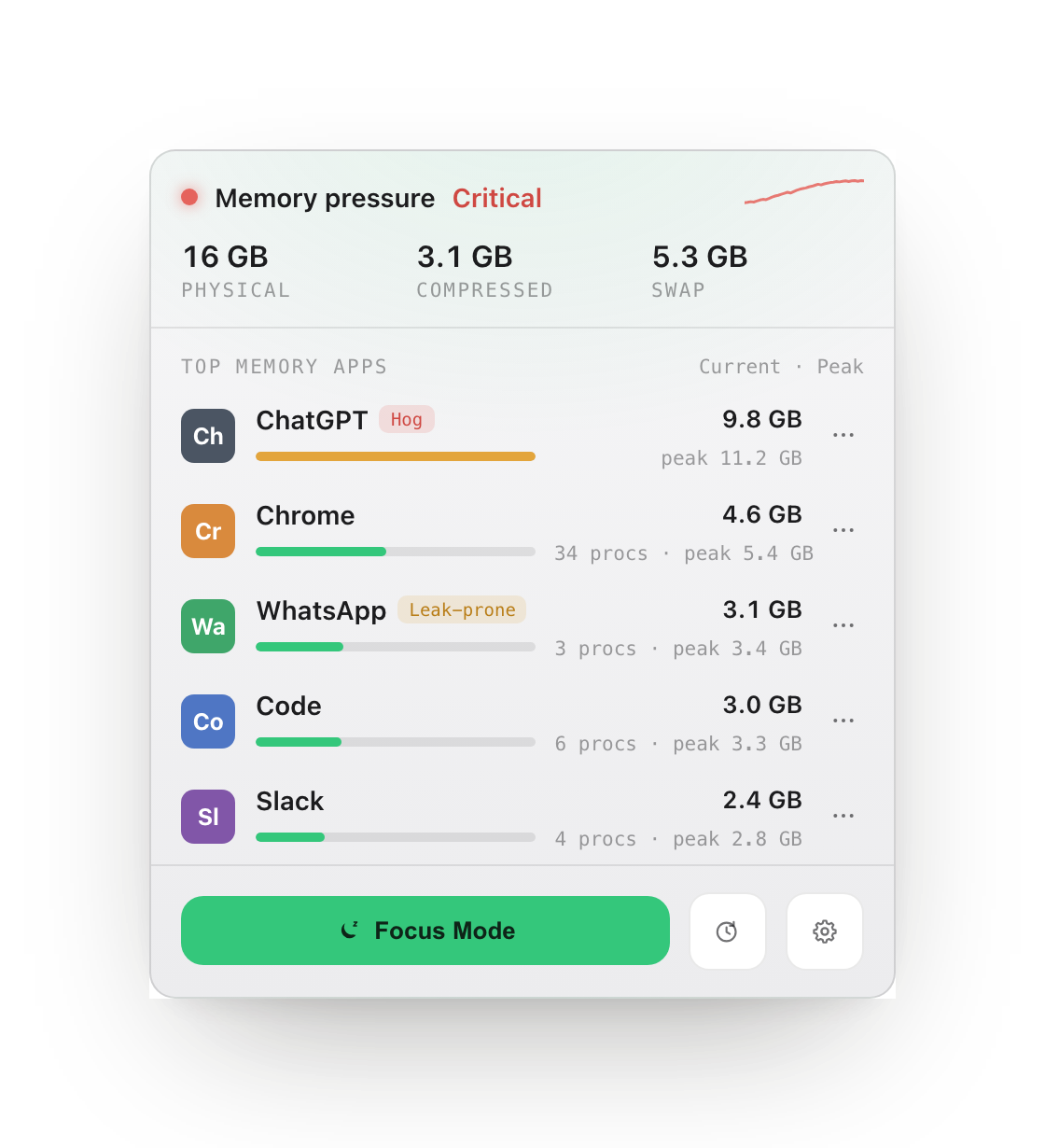
2026 年内存价格暴涨,你买的是基础 RAM 版的 Mac。RAMKeeper 精准告诉你到底是谁在吃内存(ChatGPT、Slack、Chrome),并给你规则去治理它。没有安慰剂,只有 macOS 自己上报的真实数字。
拒绝安慰剂
一个乱跳的“已释放内存”数字,什么都证明不了。
macOS 自身的内存管理已经足够激进,所以我们跳过表演,只做三件真正有用的事,每一件都有真实的前后数据背书。
精准归因
内存占用精确到每个 App、每个渲染进程。自动标记 ChatGPT、Slack、Chrome Helper 这类内存大户,展示当前与峰值占用。
阈值治理
为某个 App 设定内存上限。如果它在你设定的时间窗口内持续超限,RAMKeeper 会按你设定的规则行动(而不是瞎猜),并记录它到底做了什么。
专注模式
一键暂停一整批后台 App,回来时再一键恢复。它们不再增长,也不再抢 CPU,你正在用的 App 就能吃满整台机器。
实际效果
真实界面,真实数字,直接来自 macOS。
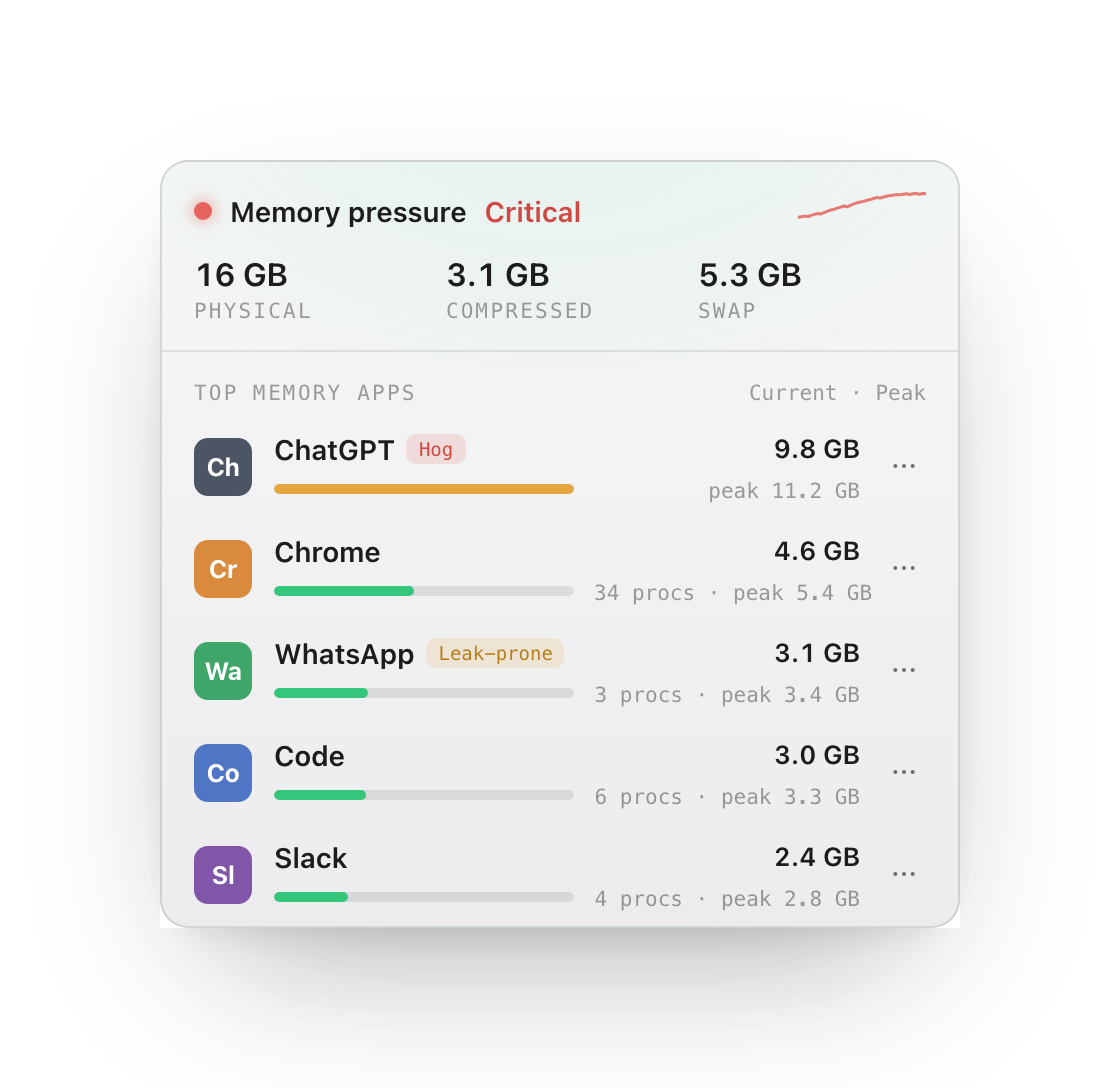
揪出真正的元凶。
浏览器和 Electron 的辅助进程会被归并到各自的父 App 下,显示当前与峰值用量,让你看清每个窗口真正的代价,而不是一堆看不懂的神秘进程。
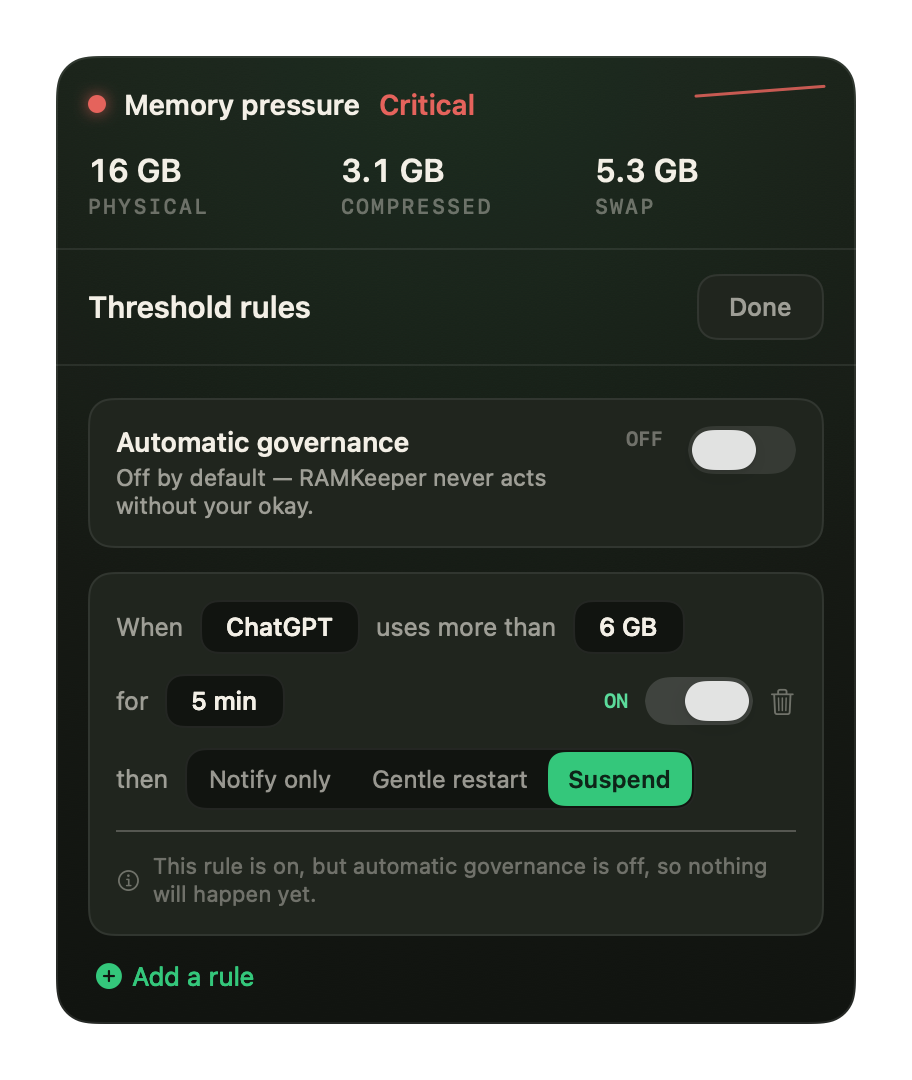
设定上限,交给规则处理。
当某个 App 超过阈值并持续足够久,RAMKeeper 可以提醒、温和重启或暂停它。默认关闭,没有你的同意它绝不会自作主张。
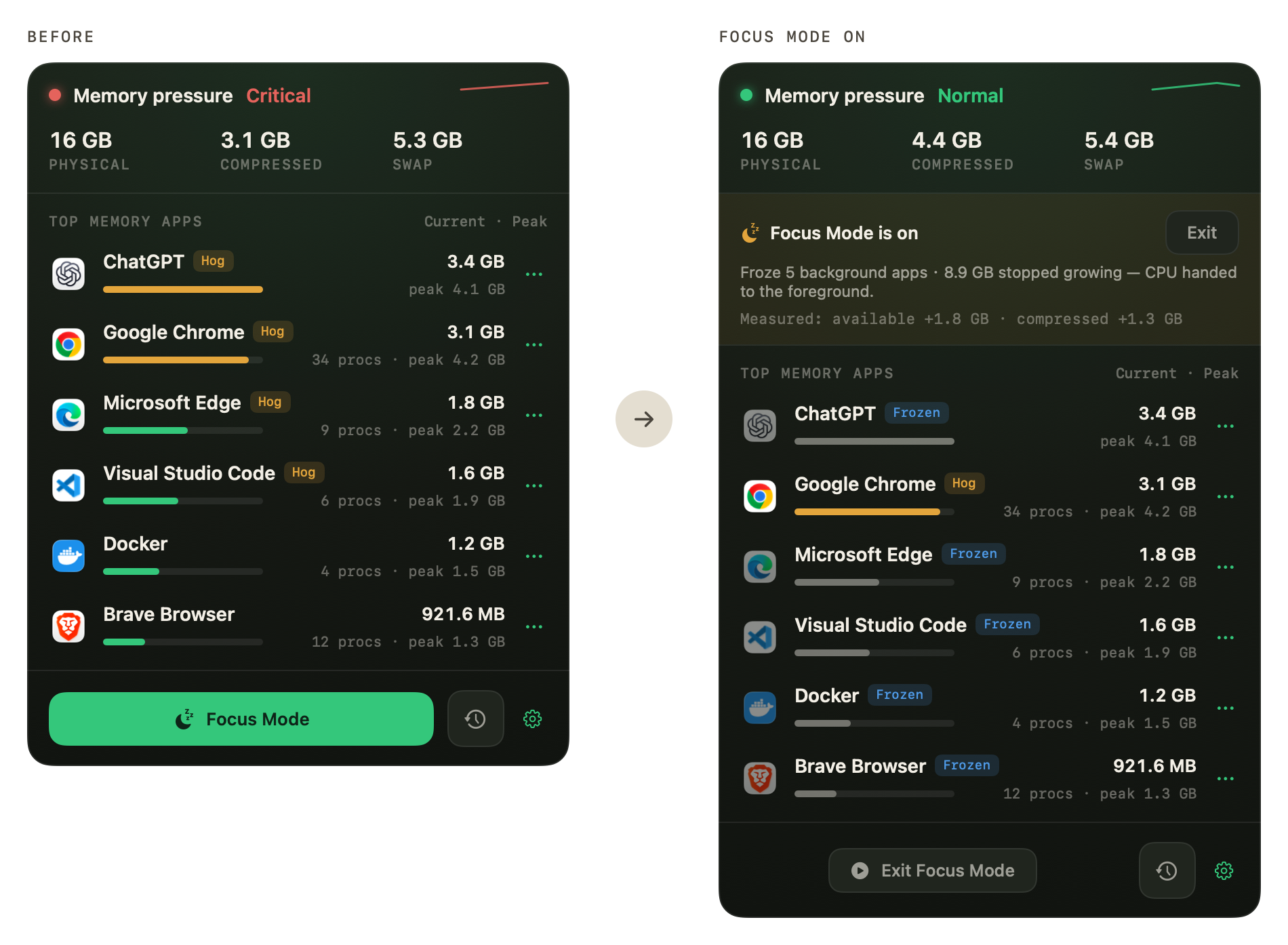
一键操作,五个 App 立刻不再抢资源。
专注模式会冻结一批高负载的后台 App:它们不再分配内存,也不再抢占 CPU,内存页随之冷下来,很有可能成为 macOS 压缩的对象。退出专注模式后,一切都会准确恢复原状,没有任何 App 被退出,也不会丢失任何内容。
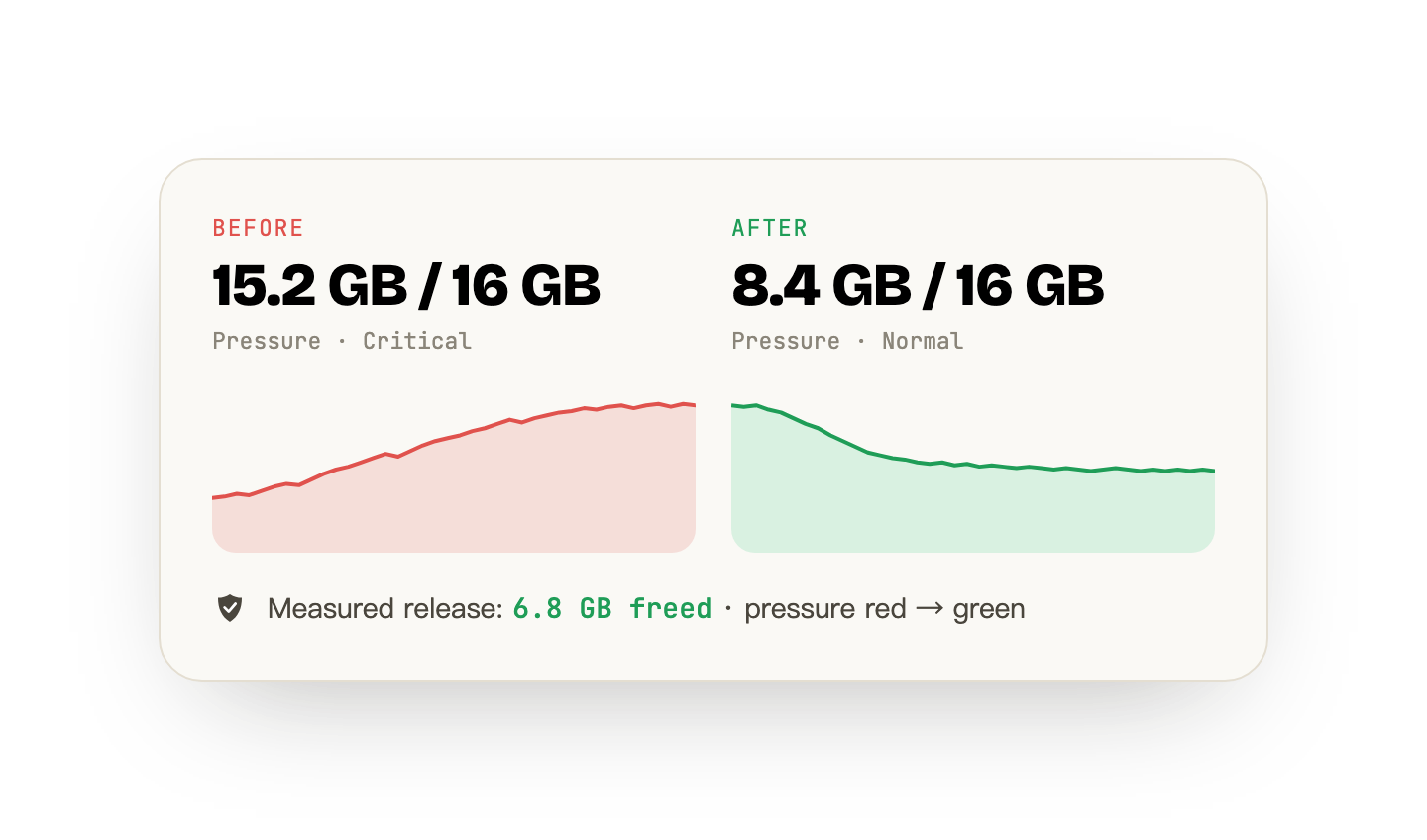
这些数字来自 macOS,不是我们编的。
每次操作都会记录系统在前后报告的真实数据,温和重启会显示它实际释放了多少内存。我们绝不编造一个“已清理内存”的数字,如果某次操作效果不大,日志会如实写明。
分步解决
三步,从“哪里不对劲”到“搞定了”。
内存压力体检
菜单栏实时显示系统压力(绿 / 黄 / 红),外加交换空间与压缩内存数据。沙箱把它限制在系统级别:这是诚实的边界,不是阉割版。
- 实时压力指示器
- 交换空间与压缩内存读数
看清到底是谁在吃内存
非沙箱版本按 App、按渲染进程精确归因,自动标记最凶的内存大户,展示当前与峰值,终于能看清问题出在哪。
- 按 App 与渲染进程归因
- 自动识别内存大户
- 当前与峰值历史记录
一键治理
自动阈值规则、批量暂停后台 App 的专注模式,以及温和重启(真正把内存还给系统的是重启,而且它会先让 App 有机会保存)。
- 阈值自动化规则
- 专注模式(暂停 / 恢复)
- 对内存大户温和重启
指南
macOS 到底是怎么管理内存的。
"Your system has run out of application memory"
What the macOS out-of-memory dialog actually means, why it fires on Macs with plenty of RAM, and how to find the process responsible instead of force-quitting at random.
Do Mac memory cleaners actually work?
What macOS already does with your RAM, what "free up memory" tools really change, and why 4% free RAM on a 64 GB Mac is a sign of health rather than trouble.
How to monitor RAM usage on a Mac
Activity Monitor, vm_stat and the menu bar — three ways to watch memory on macOS, and what every figure in the Memory tab means.
Stats vs iStat Menus vs Activity Monitor
Three ways to watch a Mac's memory and what each is actually for, including the honest answer about which to install first (the free one).
How to free up RAM on a Mac
What actually returns memory on macOS, what only appears to, and why the honest answer to this question is usually that you do not need to.
What does "swap used" mean on a Mac?
Swap is disk standing in for memory. What the figure means, why a non-zero value is not automatically bad, and the one pattern that is.
Is it a memory leak, or just a big app?
A leak has a signature you can measure: growth that survives idling and never comes back down. The test, a script that samples it, and what you can actually do when the leak is in someone else app.
Cached files in Mac memory
Several gigabytes, counted as used, and doing you a favour. What the figure contains, a measured reading, and why emptying it buys you disk reads rather than memory.
CleanMyMac alternatives, by what you actually used it for
CleanMyMac bundles five unrelated jobs. Replacing it starts with deciding which one you needed, because two of them macOS already does and one of them nothing can do.
What is wired memory on a Mac?
The one category in Activity Monitor with no owner and no process to quit. What it contains, why no app accounts for it, and the honest answer to whether you can reduce it.
How much RAM do I need on a Mac?
Three readings, taken over a week on the Mac you already have, answer this better than any recommendation can. The method, and where it points depending on what you find.
Is 8 GB of RAM enough on a Mac?
Both sides of that argument are describing their own workload. How to measure yours in a week, why an 8 GB Mac reports alarming numbers while working fine, and what to do if you already own one.
16 GB vs 24 GB MacBook Air: measure it, do not guess
You cannot add memory to an Apple silicon Mac later, so the decision deserves better than a spec sheet. Three readings you can take on the Mac you already have, and how to read them.
How much memory Mac apps actually use
A measured reading from one Mac with the method attached: what footprint, peak and RSS each say about the same app, why they disagree by more than you would expect, and the commands to take the same reading yourself.
How to uninstall CleanMyMac completely
Dragging it to the Trash leaves the background helper running. How to find every leftover on your own machine, so the method still works whatever version you have.
反订阅
$19,一次性,仅此而已。
无广告,不追踪。App 完全在你的 Mac 本地分析内存,不上报任何数据。一次购买,永久使用,并提供 14 天无理由退款保障。